Your close adult friend asks for the Nekopoi file because they're too lazy to find it themselves? That's understandable. The problem is, APK files that change hands through the wrong channels can arrive damaged, truncated, or even replaced. This guide will cover how to send the Nekopoi APK from one phone to another via a route you control, and how the recipient can verify that the file they're installing is the correct app.
Nekopoi APK
Free · 18+ users only
One thing first: we're an independent guide site, not the app developers. All the steps below use built in Android features, not Nekopoi 's own tools.
Page contents
Make sure the recipient is an adult
Nekopoi is an app for users 18 years and older. This means your responsibility doesn't end once the file is sent. Before clicking the share button, please answer these three questions honestly.
If the recipient's phone is shared, direct the recipient to the Nekopoi guide on the shared phone so they can separate profiles or set up an app lock before starting to use it.
Send via Quick Share
Quick Share, previously known as Nearby Share on non Samsung phones, sends files directly between Android phones via Bluetooth and WiFi. It doesn't use data, doesn't use third party servers, and the files received are exactly the same as the ones you sent. It's the cleanest way.
- On the recipient's phone, open the quick settings panel, tap the Quick Share icon, and then set who can send. The Everyone option can be enabled for a short period, for example, 10 minutes.
- On your phone, open the file manager, find the Nekopoi APK in the Download folder, long press it, then select Share and Quick Share .
- Select the name of the recipient's device. A prompt will appear on the recipient's screen, and they should press Accept .
- Wait until the process bar is full. Files as large as 29.5 MB usually finish in a matter of seconds if the two phones are close together.
- Once done, return Quick Share visibility on the recipient's phone to Contacts only , or turn it off altogether.
If the receiving phone doesn't appear in the list, make sure Bluetooth and WiFi are turned on on both phones, then move them closer together. In some versions Android, location also needs to be turned on for nearby devices to be discovered.
Send via USB cable
If Quick Share isn't available, for example, if one of your phones is old, a cable is still your best bet. There are two options.
Via computer
- Connect your phone to the computer with a data cable, then select the Transfer file mode on the USB notification.
- Copy the APK file from the Download folder to your computer desktop.
- Unplug your phone, connect the recipient's phone, select the same mode, then paste the file into their Download folder.
Via flash disk and OTG adapter
Almost all Android phones can now read flash drives via an OTG adapter. Copy APK to the flash drive from the first phone, plug it into the second phone, then move the file to the Downloads folder. The advantage of the cable method is that there's no other party in the way. The only downside is that it's a bit cumbersome.
Why not via chat group or random link
Throwing APK into WhatsApp or Telegram groups may seem convenient, but there are several compelling reasons not to do so.
- Uncontrolled recipients: there could be minors in the group, and files in the group could be forwarded to anyone without your knowledge.
- Files can be exchanged: in a large group, anyone can upload files with the same name but different content. Later users won't know which one is the original.
- Cloud links without a source: download links circulating without a clear origin are often loaded with ads, fake download buttons, or files that have been inserted with other code.
- Outdated version: Old files keep spinning. Recipients end up installing outdated versions and then wonder why the app is having problems.
When in doubt, the cleanest way is not to send the file at all. Just send a link to Nekopoi download page so the recipient can download the v2.5.4.7 version directly from the same source as you.
The recipient must still give permission
Files sent via Quick Share or a cable are still considered to originate from outside Play Store. Therefore, on the receiving phone, Android will request permission to install unknown apps . This permission is granted to the app that opens the file, usually a file manager, not to Nekopoi itself.
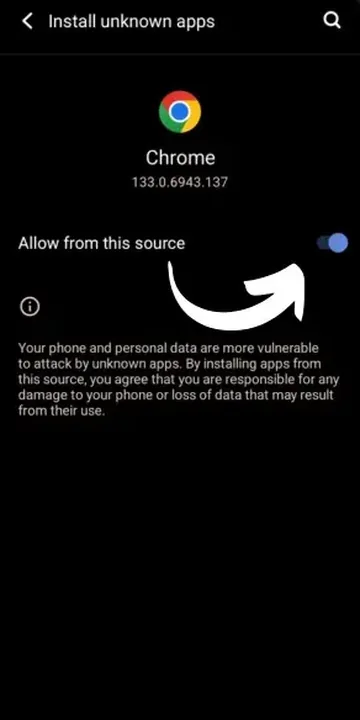
- The recipient opens the APK file from the file manager.
- When the warning appears, press Settings , enable Allow from this source , then go back.
- Press Install and wait for the message that Kucing is installed. Kucing is the name of the app that appears on the home screen.
Once the installation is complete, it's best to disable the permissions again. A full explanation of this can be found in the Nekopoi app permissions article.
Check the files and apps
This quick check takes two minutes, but can save the recipient from a fake file.
- File size: Before installing, open the file details in your file manager. A valid APK should be around 29.5 MB. Files that are only a few hundred KB, or much larger, are suspicious.
- Package name: The correct app uses the package name com.kcstream.cing. On some phones, the package name is listed at the bottom of the App Info page. If it's not displayed, a package checker app from Play Store can show it.
- Play Protect: Open Play Store, tap your profile picture, select Play Protect , then Scan . This scan also checks apps installed outside Play Store.
- Home screen name: The icon that appears is called Kucing. If the name is anything else, delete it and try again from a known source.
Delete APK file after installation
APK files left in the Downloads folder are useless after the app is installed. They could even be a clue to someone borrowing your phone, or accidentally resent. Open your file manager, go to Downloads, delete the Nekopoi file, and empty the trash if your file manager has that feature. Do the same on the sender's phone if you no longer need the file.
Frequently Asked Questions
Does Quick Share use internet quota?
No. Quick Share sends files directly via Bluetooth and local WiFi between two phones, so it doesn't use up your data plan.
Can this APK be sent to iPhone?
The file may be sent, but it won't install. APK only works on Android. iPhone users can read iPhone specific guide on this site.
The recipient sees the message failed to parse the package, why?
Usually the file was truncated during sending, or the recipient's Android version is too old. Nekopoi requires Android 6.0+. Resend the file and compare its size with your original.
Are my bookmarks sent?
No. Only the installation file will be sent. If you're switching phones, use the bookmark backup feature in the app's Settings, if available on your version.
Can it be sent to a group if all members are adults?
We still don't recommend it. Files in a group are easily forwarded and difficult to track. Send them directly to one person, or simply share the download page link.