Every Android app requests certain permissions, and apps installed from APK like Nekopoi deserve closer scrutiny. The good news is, you don't need to be an expert to assess whether a permission is reasonable. Just ask yourself one question: does the streaming app really need this access to function?
Nekopoi APK
Free · 18+ users only
A frank disclaimer: we're an independent guide site and don't dissect the app's contents. All we know for sure is the package name, com.kcstream.cing, and the name displayed on the home screen, Kucing. So, this article contains general Android guidance, plus an overview of reasonable permissions for streaming apps. Your phone's permissions may vary slightly depending on the app version and Android version.
Page contents
How to see Kucing permissions on your phone
- Go to Settings , then Apps .
- Find Kucing in the app list and tap it.
- Tap Permissions . Here you'll see what's allowed and what's not.
There's also a second option via the Permission Manager. On Android 12 and above, this menu is usually found in Settings , Security & Privacy , Privacy , Permission Manager . There, you'll see a list of permissions, such as which apps can use the camera. The Privacy Dashboard also shows which apps have recently accessed your location, camera, or microphone. The menu's location may vary by phone brand.
Reasonable permissions for streaming apps
This table summarizes the permissions that video player apps typically require, including some that never come up as a question because Android grants them automatically.
| Permission | Its use | Asked? |
|---|---|---|
| Internet and network status | Loading title list, playing video, checking connection | No, normal permission |
| Notification | News of updates or new titles, if you want | Yes, on Android 13 and above |
| Storage or media | Save downloads for offline viewing | Depends on Android version |
| Biometrics | Fingerprint lock within the app | No, normal permission |
| Keep the screen on | The screen does not turn off while the video is running. | No, normal permission |
Internet and network status
Without internet, streaming apps can't work. Android classifies internet permissions and network status reading permissions as normal permissions: they carry minimal risk, so they're granted during installation and typically don't appear as toggle switches. On some phones, these permissions are listed at the bottom of the permissions page.
Notification
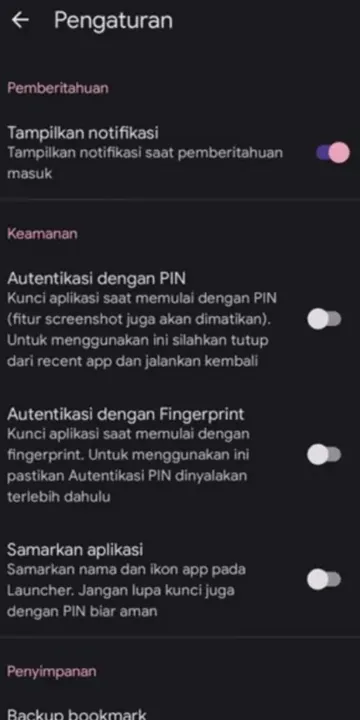
Since Android 13, apps are required to ask before sending notifications. So when you first open Kucing, it's understandable that this question appears. You can decline. If your phone is often seen by others, declining notifications is a reasonable option, especially since the app also has its own notification toggle in the Settings menu.
Storage for offline downloads
This section is often the most confusing because the rules change with each Android version. In Android 6 through 9, apps wanting to write to shared storage typically requested storage permission. Starting with Android 10, and even more restrictive in Android 11, apps can save files in their own folders without any permission. In Android 13 and later, the old storage permissions are split into photos and videos and music and audio.
In conclusion: requests for photo and video access are understandable for video apps, but not an absolute requirement. If you decline and the download feature still works, it means the app doesn't need it.
Install from unknown sources is for the browser, not the app.
Many people assume the Install unknown apps permission is granted to Nekopoi. In fact, that permission belongs to the app that opens the APK file, namely a browser like Chrome or a file manager. Kucing itself doesn't require it to run.
Once the installation is complete, revoke the permissions again via Settings , Apps , Special app access , Install unknown apps . Select the browser or file manager you were using and toggle it off. When you update to a new version, simply turn it back on briefly.
If Kucing appears in the Install unknown apps list, leave the toggle off. Some apps outside Play Store do register there for self update, but you can still update through your browser without granting that permission.
Red flag: unreasonable permissions
Video watching apps have no reason to request these permissions. If any of them appear, deny them. If the app insists on running without those permissions, simply delete it, as the file you installed is likely not genuine. Files from other people should be verified using our guide on sharing APK safely.
- Contacts: streaming apps don't need to know who your friends and family are.
- SMS and call logs: This access can be used to read bank OTP codes or your call history. Google itself strictly limits this permission for apps in Play Store.
- Location: the content of the app is independent of your position, so precise location is completely irrelevant.
- Camera and microphone: no viewing activity requires either.
- Accessibility: Accessibility services can read screen content and press buttons on your behalf. This is a favorite permission of malicious apps.
- Device admin: admin rights can be used to lock the screen or make it difficult to delete apps.
- Notification access: This is different from sending notifications. This access allows you to read all notifications from other apps, including the contents of chat messages.
How to revoke permission and auto reset
- Go to Settings , Apps , Kucing , Permissions .
- Tap the permission you want to revoke, then select Don't allow .
- For permissions that have multiple levels, choose the narrowest one, for example Only while the app is in use or Ask every time .
Android 11 and above also have an automatic reset: if an app isn't opened for a long time, its permissions are automatically revoked. In the app's Info page, look for a toggle like Remove permissions if app isn't in use or Pause app activity if not in use , and leave it on. A side effect is that notifications may stop after a few months of inactivity. You can simply re allow them.
Revoking notification permissions won't affect your bookmarks or downloads. If offline downloads don't open after revoking media permissions, that means the permissions were in use, and you can turn them back on.
Frequently Asked Questions
Does Nekopoi need a location permit?
There's no compelling reason to watch videos. If asked, simply decline. The app should still work as usual.
Why is the internet permission not visible in the Permissions list?
Because the internet is a normal permission granted automatically during installation, Android doesn't display it as a toggle switch.
I have already rejected the notification, can I change it later?
Yes. Go to Settings, Apps, Kucing, Notifications, then turn it on. Make sure the notification toggle in the app Settings is also on.
Do PIN and fingerprint locks require special permission?
This usually doesn't appear as a question. The fingerprint feature uses standard biometric permissions, and your fingerprint data is stored by the Android system, not the app.
What permissions does the app's Disguise feature need?
Changing the name and icon on the home screen generally doesn't require additional permissions. If such a feature suddenly requests accessibility permissions, decline it.