A phone changes hands frequently throughout the day. Your little brother borrows it to play games, your nephew watches cartoons, your partner uses it for video calls. If Nekopoi, an anime streaming app intended for viewers aged 18 and over, is installed on that phone, you bear an additional responsibility: the app must not be accessible, and preferably not visible, to anyone under the age of consent.
Nekopoi APK
Free · 18+ users only
This article explains the layers of protection you can install yourself without additional apps, from Android built in separate space, in app locks, to notification settings. No single trick will cover all the vulnerabilities, so think of each step as a layer, then stack several at a time.
18+ only. The safest route remains the simplest: if you have the option, install Nekopoi on a phone you own only. This guide is for situations where a shared phone must be used.
Page contents
Age verification is in your hands
These types of apps generally only display age confirmation, and the "Agree" button can be pressed by anyone. So, whether or not the age check actually works is your decision as the phone owner. Before setting anything, answer these questions honestly:
If the answers indicate that the child frequently uses the phone, the next steps are no longer optional, but mandatory. Also, please read our 18+ disclaimer to understand the limits of this guide's responsibility.
Move apps to a separate space
The neatest way is to install Nekopoi in a locked area of your phone, so its icon doesn't appear on the main screen where everyone sees it. Almost every brand has its own version.
Private Space on Android 15
On phones running Android 15 or later, go to Settings, then Security & Privacy, then Private Space. Android creates a small, locked profile with its own Play Store, browser, and file manager. Download and install APK from that space, not from the main profile. When Private Space is locked, its apps disappear from the app list and their notifications are muted.
Secure Folder on Samsung
Galaxy users can use Secure Folder. Enable it in Settings, Security & Privacy, then open the folder and install APK using the My Files app inside. This folder has a PIN or pattern separate from the lock screen, and its icon can also be hidden from the app drawer.
Second Space on Xiaomi and guest users
Some Xiaomi phones with MIUI have Second Space, a second space with a different password. Other brands, including Pixel, have a multi user feature in Settings, System, Multi users. The reverse is also useful: let your child use guest mode while the main profile containing Nekopoi remains locked.
| Feature | Available at | Application icon | Security |
|---|---|---|---|
| Private Space | Android 15 and above | Hidden when locked | Lock it yourself |
| Secure Folder | Samsung Galaxy | Can be hidden | PIN or own pattern |
| Second Space | Some Xiaomi MIUI | Only in the second room | Own password |
| Guest mode | Supported phone | Not visible to guests | Main profile remains locked |
PIN Lock and Disguise apps
The second layer is within Nekopoi itself. The app's Settings menu provides a PIN lock, fingerprint lock, and a Disguise app option that changes the name and icon in the launcher.
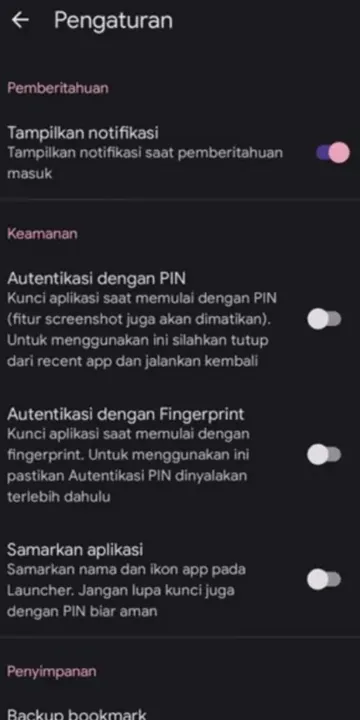
- Open the app (its name on the phone is Kucing ), then go to Settings .
- Turn on the PIN lock and choose a number that is not the same as the phone's lock screen PIN.
- If your phone has a sensor, add a fingerprint lock so you don't have to bother typing.
- Enable Disguise apps to keep their icons and names out of sight on the home screen.
- Close the app completely, then reopen it to ensure the PIN is actually requested.
Disguising an app only changes its appearance, it doesn't lock anything. A mischievous child could still access the icon, so always set a PIN lock.
Hide notifications on lock screen
Notifications are often overlooked. The title of a new episode can appear on the lock screen when your phone is lying on a table. There are three ways to set this:
- In the app: turn off the notification switch in Nekopoi Settings if you don't need release news.
- Per app on Android: Settings, Apps, select Kucing, Notifications, then turn everything off
- Lock screen: Settings, Notifications, Notifications on lock screen, select don't show any notifications, or hide sensitive content
Also, check for any other permissions that might be unnecessary. A full explanation can be found in the Nekopoi app permissions article.
If the child has his own phone
For children's phones, install Google Family Link from the parent's phone and link it to the child's Google account. From there, you can approve every new app from Play Store, limit screen time, and enable the adult site filter in Chrome. Supervised child accounts also typically restrict app installation from unknown sources, making it difficult to install APK from outside Play Store.
Family Link doesn't replace chatting. Explain phone rules in age appropriate language, and check the settings regularly, as older children quickly learn to find loopholes.
If the child has already seen it
Sometimes all layers are compromised. When that happens, your first reaction is crucial:
- Stay calm. Being too angry can make your child afraid to talk about it again.
- Gently ask him what he sees and how he can open it.
- Briefly explain that the app is made specifically for adults, not for children.
- Close the gap that day: change PIN, move apps to a separate space, check history.
- If your child seems restless for days, don't hesitate to consult a child psychologist.
If after all this you feel the risk is too great, just delete the app from the shared phone and reinstall it later on your personal phone via our download page.
Frequently Asked Questions
Is Disguise app enough to hide Nekopoi?
Not yet. That option only changes the name and icon in the launcher. Keep PIN or fingerprint lock enabled, and ideally, install apps in Private Space or Secure Folder.
My phone doesn't have Android 15 yet, what's the replacement?
Check your brand's built in features: Secure Folder on Samsung, Second Space on some Xiaomi, or multiple users and guest mode features in Settings, System.
Can children open apps via notifications?
If PIN lock is enabled, the app will still ask for the PIN. However, the notification title will be visible, so turn off the app's notifications or hide them from the lock screen.
Can Family Link block APK?
On supervised child accounts, installations from unknown sources are usually restricted. Regularly check the app list on your child's phone.
Forgot the app PIN, what should I do?
Usually, the solution is to clear the app data through Android Settings. Bookmarks may also be lost, so use the bookmark backup feature first.