
Nekopoi APK v2.5.4.7 Download New Version for Android [2026]

Nekopoi is an Android app for watching anime with Indonesian subtitles, specifically for adult audiences. Download the latest APK file using the pink button below, then read the installation instructions and privacy tips on this page.
Summary
- Free
- No root
- Android 6.0+
For adults only, minimum age 18.
Files we check before installation
Welcome to the Indonesian version Nekopoi guide. Before we change the download button to the new release, we first install the file on a test phone: the package name should be com.kcstream.cing , its size should be around 29.5 MB, and the app should open normally without requesting any strange permissions. We store files that pass the check on our own server, so the buttons on this page never lead to fake files.
What is Nekopoi APK?
Nekopoi APK is an installer package for Nekopoi app for Android. Once installed, the icon on your phone screen usually has a Kucing icon, which is why many people call it the Kucing APK. Its function is to stream anime online with Indonesian subtitles, and it's clearly aimed at adult audiences.
Due to its adult rating, Nekopoi is not sold on Google Play. There's only one way: download the APK file, grant installation permission once, and then install it yourself. This page contains download links that we always point you to the latest release, plus everything you need to know before and after installing.
Nekopoi APK Screenshot
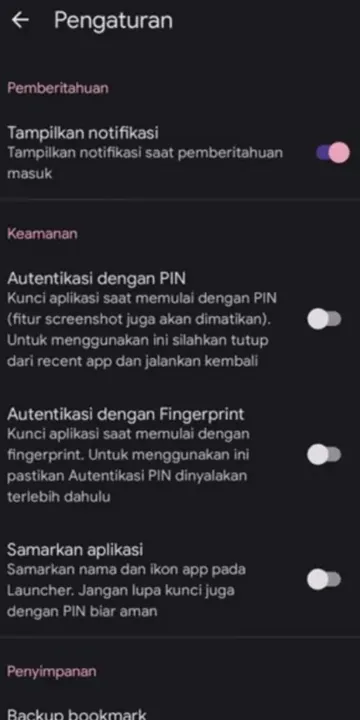
All screenshots above are taken from the original app. We've intentionally blurred the cover art and watch titles, leaving only the menu visible.
Application info and minimum specifications
Please ensure your phone meets the requirements below. We've taken the size, package, and Android version data directly from the APK files linked on this page.
| Application name | Nekopoi (appears as Kucing ) |
| Version | v2.5.4.7 |
| File size | 29.5 MB |
| Minimal system | Android 6.0+ |
| Package name | com.kcstream.cing |
| Category | Anime streaming for adults |
| Translation | Indonesian |
| Price | Free |
| Age limit | 18 years and above |
| Need root | No |
| It's on Play Store | No, installed from APK |
| Updated info | November 2026 |
Page contents
- Main features Nekopoi APK
- Sections within the app
- What's changed in the latest version
- How to download and install
- How to use Nekopoi
- How to update to the latest version
- Tips for comfort and privacy
- System requirements
- Advantages and disadvantages
- Is Nekopoi safe?
- Common problems and solutions
- Official alternative
- Frequently Asked Questions
- Conclusion
Why do many viewers choose Nekopoi
The answer is simple: everything is ready to use in one small app. Indonesian translations are embedded into the videos, the title list is neatly organized, and there's no complicated registration process. For adult viewers who want convenience, that combination is hard to find anywhere else. Keep in mind, though, that convenience comes with responsibility: the app should be kept securely away from children.
Another reason we often hear from readers is habit. Many have used the app for years, know its location by heart, and don't want to learn from scratch on another service. As long as the files are retrieved from a clear location and updated regularly, this habit is fine to maintain.
Main features Nekopoi APK
Indonesian translation
The subtitles are integrated into the video. You don't need to search for a separate subtitle file, you don't need to time shift the subtitles, and you don't need any additional apps.
Title index from A to Z
In addition to the release list, there's an index based on the first letter. This method is much faster if you only remember the first name and don't want to scroll through the entire page.
Search field
Type part of a title's name, then select it from the results that appear. The magnifying glass icon is in the top right corner of almost every home screen.
PIN and fingerprint lock
In the Settings menu, there's an option to lock the app with a PIN or fingerprint. Once activated, Nekopoi will always require a lock every time it's opened, and the screenshot feature will also be disabled.
Disguise the app
This option changes the app's name and icon on your phone's screen, so anyone who borrows your phone won't immediately know what it is. Use it in conjunction with a PIN lock to ensure complete privacy.
Save to watch without internet
Some episodes can be saved to your phone's memory and played back when the signal is poor. This feature takes up storage space, so be sure to delete episodes you've finished watching.
Bookmark backup
Your bookmarked titles can be backed up from the Settings menu. This is especially useful if you change phones or need to reinstall the app.
Release notifications that can be turned off
The app can notify you when new titles are available. If you prefer a quieter phone, simply turn it off by switching to Show notifications in Settings.
Built in video player
Videos play directly within the app. Smoothness depends more on your network than your phone. If you experience frequent stuttering, see our guide on how to fix buffering issues.
A dark display that is easy on the eyes
The interface uses dark colors with pink accents, as seen in the screenshot above. This display is more comfortable for nighttime viewing and is slightly more battery efficient on AMOLED displays.
Small size, no account
The file is only about 29.5 MB and doesn't require registration. You can immediately open the title list once the app is installed.
Sections within the app
So you don't get confused when you first open the app, here are the sections you will encounter:
- Home with latest releases
- Title index by letter
- Title search
- Marked watch list
- Downloads to watch without internet
- Settings: notifications, security, storage and backup
What's changed in the latest version
We've been linking to the v2.5.4.7 release since November 2026. Nekopoi developers don't publish official changelogs, so we're just listing what we've seen ourselves when testing the files:
We only link to the original app. There are no modified versions on this site, and we advise you to stay away from files claiming to be modified, as no one can verify their contents.
How to download and install Nekopoi APK
Install on Android phone
- Press the Download Nekopoi APK button on this page, then wait until the download is complete.
- Open the file from the download notification or from the Files app.
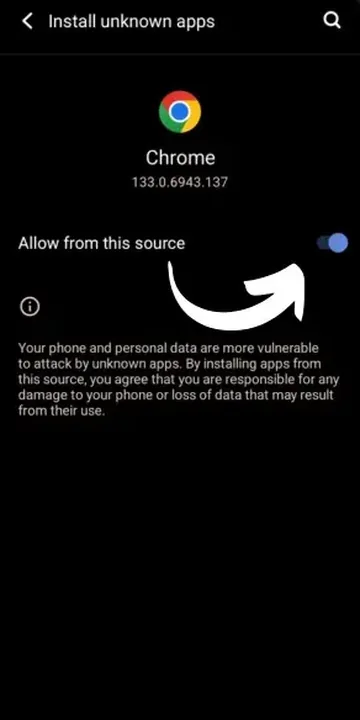
- Android will ask for permission. Tap Settings , turn on Allow from this source for your browser or Files app, then go back.
- Tap Install and wait a few seconds.
- The message Kucing was installed or "App installed" appears. Open the app, then disable the source permission again for security reasons.
Install on PC or laptop
- Install an Android emulator like BlueStacks 5 or LDPlayer 9 on Windows.
- Download the Nekopoi APK file from this page to your computer.
- Drag the file into the emulator window, or use the Install APK button in the emulator.
- Open Kucing from the emulator's main screen.
Complete steps are in the Nekopoi for PC guide.
Use on iPhone and iPad
iOS can't open APK files at all, so there's no way to install Nekopoi on iPhone. Avoid sites that promise an iOS version, as they usually just ask for a configuration profile or account data. The explanation is on the Nekopoi for iPhone page.
Install on Android TV
- Copy the APK file to a flash drive, then plug it into your TV or TV box.
- Open the file manager on the TV and select the file.
- Allow installation for the file manager, then press Install.
This app is designed for touchscreens, so on a TV, you might need an air mouse or a remote with a cursor for some buttons. Also, set a PIN lock, since the TV in the living room is easily visible to anyone.
How to use Nekopoi
Once opened, the app immediately displays the homepage. Tap a title to see the episode list, select an episode, and then press play. The bookmark icon saves the title to your list, while the download icon saves the episode to your phone's memory.
Before you start watching, take a minute to open Settings. Enable PIN lock, consider the app's disguise option, and then configure notifications to your liking. These three small steps make the app much safer on phones that are often shared. Complete tips are in the guide to using Nekopoi on shared phones.
How to update to the latest version
Nekopoi can't update itself through Play Store, so updating is done manually. The good news is, the process is exactly the same as installing it for the first time and only takes a minute or two.
- Go to Settings in the app and back up your bookmarks, just in case.
- Return to this page, then download the latest file via the download button.
- Open the file and tap Install. Android will say Update because the app already exists.
- Open the app, make sure the bookmark is still there, then delete the APK file from the Download folder.
Don't delete old apps before updating, unless Android refuses to install them. Deleting will lose any settings and watchlists that haven't been backed up.
Tips for comfort and privacy
System requirements
| Part | Minimum | Recommended |
|---|---|---|
| Android System | Android 6.0+ | Android 10 or later |
| RAM | 2 GB | 4 GB or more |
| Empty space | 200 MB | 1 GB if you frequently save episodes |
| Network | 3 Mbps | 10 Mbps or home WiFi |
The minimum settings above are sufficient for opening the app and watching at low resolution. If you want a sharper picture, skip episodes without long pauses, or frequently save episodes, follow the recommended settings. Phones with nearly full memory are also prone to lag, so make sure you have plenty of free space before blaming the app.
Another thing that's often overlooked: Android System WebView and Chrome should always be up to date. Many streaming apps use these components behind the scenes, so outdated versions can cause pages within the app to fail to load.
Advantages and disadvantages Nekopoi APK
Excess
Lack
Is Nekopoi safe to use?
The biggest risk with off store apps isn't the app itself, but rather fake files circulating under similar names. Keep this checklist in mind:
A warning from Play Protect doesn't necessarily mean the file is malicious. Android does issue warnings for apps not sourced from its store. The important thing is to read the warning carefully: if Play Protect labels the app as malicious and recommends deleting it, follow its advice and report it to us via the contact page.
An explanation of each permission is in the Nekopoi app permission guide.
Common problems and solutions
- The app isn't installing: this is usually because another version with a different signature is available. Uninstall the old Kucing app and reinstall it from this page.
- The file cannot be opened: the download may have been interrupted. Delete the file, connect to a stable network, and then try downloading again.
- Video keeps looping: lower the resolution, switch to WiFi, or wait a while as the server may be busy.
- Play Protect warning: read the contents carefully. If your file is from this page and the package name matches, you can proceed; if in doubt, cancel.
- Forgot app PIN: clear app data in Settings, then restore bookmarks from a backup if you made one.
Official alternative to watch anime
If you prefer apps from official stores, the following licensed services are available in Indonesia and have Indonesian translations for many titles:
- Crunchyroll , the largest anime catalog with free and paid plans
- Bstation , popular in Southeast Asia, some titles can be watched for free
- Netflix , a growing anime collection, subscription based
- Muse Indonesia and Ani One Asia , the official free YouTube channels
- Vidio , a local service with a number of licensed anime
Frequently Asked Questions (FAQ)
Is Nekopoi APK free?
Yes, the files are free to download and the app is free to use.
Do I have to create an account?
No. You can directly open the title list after the app is installed.
Who can use Nekopoi?
For adults aged 18 and over only. Do not install it on phones or tablets that children also use.
Why is it called Kucing after it is installed?
That's the name the app uses on your phone's screen. The package name remains com.kcstream.cing.
Are bookmarks lost when updating?
No, as long as the new file is installed directly over the existing app, without uninstalling it.
What versions Android are supported?
Minimal Android 6.0+. Newer phones are certainly smoother.
Can it be used on PC?
Yes, via an Android emulator like BlueStacks 5 or LDPlayer 9.
Can I watch without internet?
This can be done for episodes that you have previously saved via the download icon in the app.
How to hide the app?
Enable PIN lock and hide apps option in Settings menu, then hide notification content on lock screen.
Does this site belong to the Nekopoi developer?
No. We are an independent guide site that is not affiliated with the app developers.
Conclusion
Nekopoi v2.5.4.7 is suitable for adult viewers who want a small, practical app in Indonesian. The key lies in three things: get the file from a reliable source, enable app lock, and regularly install the latest version. The button below always points to the most recent release we've found.
Legal pages and quick links
Disclaimer: This site is an independent guide. We do not create the app, do not host any videos, and are not affiliated with the Nekopoi developers. The linked APK file is a copy of the original app, hosted on our site's servers.
18+ only. Nekopoi is designed for adult audiences. Underage readers should stop reading here, and the app should not be installed on devices that children also use.
About us · Disclaimer 18+ · Privacy · DMCA · Contact us